Google Business Profile optimization guide

46% of all Google searches have local intent — yet most business owners spend less than 30 minutes setting up the profile that determines whether they win or lose those searches. If you have ever wondered why a competitor with a worse website outranks you on Google Maps, the answer is almost always hiding inside their Google Business Profile (GBP).

This Google Business Profile optimization guide covers every lever you can pull in 2026 — from first-time setup to advanced ranking tactics used by top local SEO agencies. Whether you run a single-location bakery or manage 50 client profiles, this guide gives you a complete, actionable playbook. To thrive in local search results, it’s essential to optimize your Google Business profile regularly. Keeping your information up-to-date and engaging with customer reviews can significantly impact your visibility. This guide will also explore common pitfalls to avoid to ensure maximum effectiveness.


Key Takeaways 📌

  • Primary category selection is the single highest-impact optimization decision you will make on your GBP.
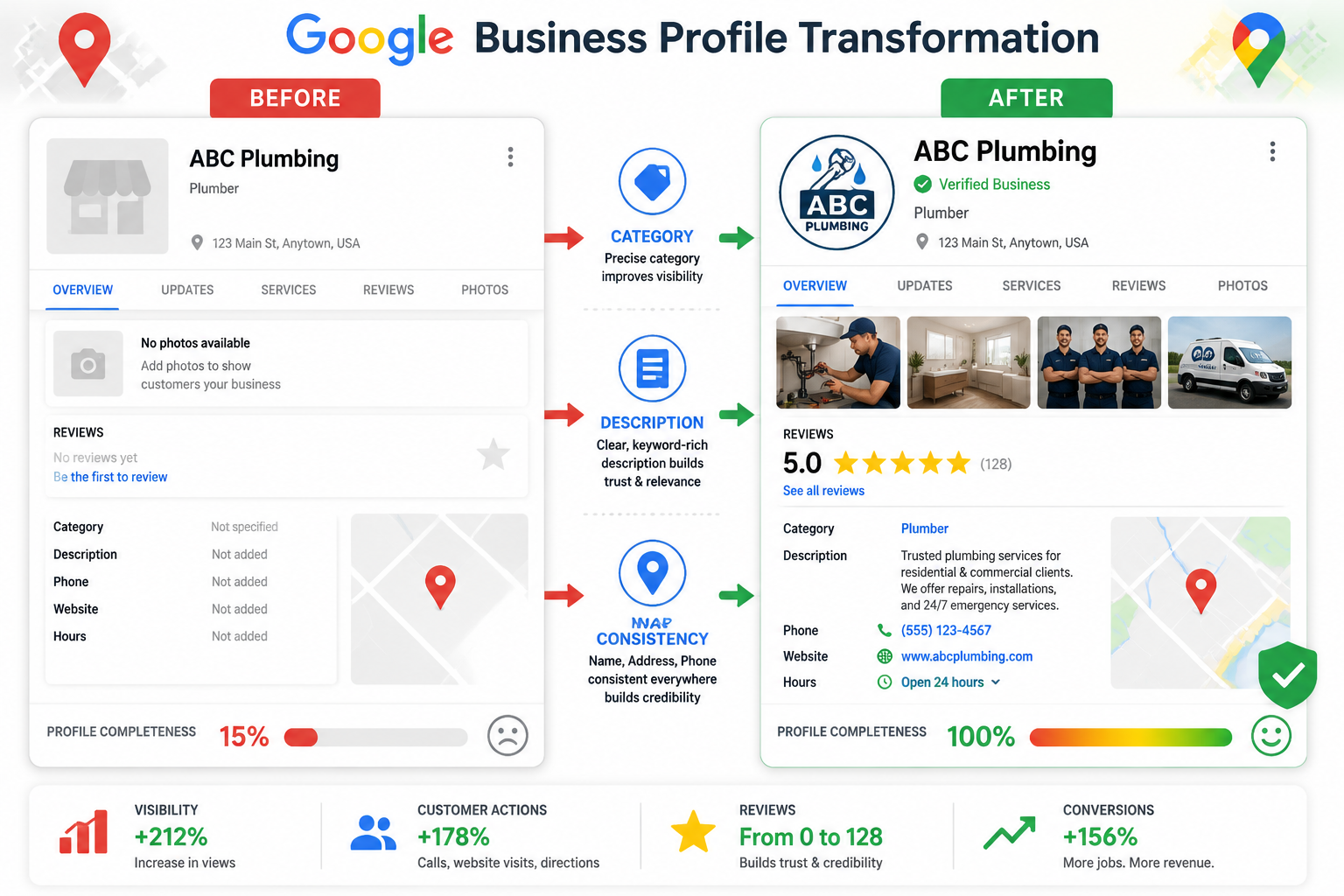
  • NAP consistency (Name, Address, Phone) across all directories is a non-negotiable ranking and suspension-risk factor.
  • Business hours, review response time, and services are now explicit ranking signals in 2026 — not just best practices.
  • Visual content, booking integrations, and Q&A optimization drive measurable conversions beyond just rankings.
  • A monthly-quarterly-annual audit cadence prevents data drift and keeps your profile competitive long-term.

() infographic-style illustration showing a Google Business Profile dashboard split-screen: left side labeled BEFORE showing

Part 1: Foundation — Claiming, Verifying, and Structuring Your Profile

Step 1: Claim or Create Your Profile

Go to business.google.com and search for your business name. If a listing already exists (common for established businesses), claim it. If not, create a new one. Do not create a duplicate — Google may suspend both listings.

💡 Pro tip: Search Google Maps for your business name before starting. Unclaimed profiles often already have user-generated photos and even incorrect information that needs correcting immediately.

Step 2: Choose Your 2026 Verification Method

In 2026, Google offers four verification methods:

Method Timeline Best For
Postcard mail 5–14 days Most brick-and-mortar businesses
Phone (SMS/call) Instant Eligible established businesses
Email Near-instant Service-area businesses
Video verification 1–3 days New businesses, expedited cases

Video verification — introduced in 2025 — requires you to record a short clip of your storefront, signage, and interior. It is increasingly the fastest path for new businesses. Keep your recording steady, well-lit, and clearly showing your business name and location.

Step 3: Master NAP Consistency

Name, Address, Phone (NAP) consistency is foundational. Discrepancies across directories do not just hurt rankings — they risk profile suspension.

Common NAP mistakes to avoid:

  • Using “St.” in one place and “Street” in another
  • Listing a suite number inconsistently (Suite 200 vs. #200 vs. Ste. 200)
  • Using a tracking phone number that differs from your primary listed number
  • Abbreviating your business name on some directories but not others

Action: Audit your top 10 directory listings (Yelp, Bing Places, Apple Maps, Facebook, Yelp, YellowPages) and standardize every field to match your GBP exactly.

Step 4: Select Your Categories (The #1 Ranking Decision)

Primary category selection is the single most impactful optimization decision in this entire guide. Google uses your primary category to determine which searches trigger your profile.

Always choose the most specific category available:

❌ Too Broad ✅ More Specific
Restaurant Mexican Restaurant
Beauty Salon Hair Salon
Plumber Emergency Plumber
Doctor Pediatric Dentist
Lawyer Personal Injury Attorney

After setting your primary category, add 3–5 secondary categories that reflect genuine additional services. Do not add categories just to appear in more searches — irrelevant categories dilute relevance signals.

How to test category changes:

  1. Document your current impressions in GBP Insights.
  2. Change the primary category.
  3. Observe performance over a 4–8 week window before evaluating.
  4. Revert if impressions drop significantly.

Step 5: Write a High-Converting Business Description

Your description has a 750-character maximum. Use it wisely.

❌ Keyword-stuffed (Google now penalizes this):

“Best plumber plumbing services emergency plumber Minneapolis plumber affordable plumber near me plumbing repair…”

✅ Specific and natural:

“Family-owned plumbing company serving Minneapolis homeowners since 2008. We specialize in emergency pipe repair, water heater installation, and bathroom remodels — with same-day service and upfront pricing. Licensed, insured, and available 24/7.”

Description formula:

  1. Who you are (specific, not generic)
  2. What you do (lead services, not a laundry list)
  3. Who you serve (location + customer type)
  4. Why choose you (differentiator or proof point)

In 2026, Google’s AI will actively evaluate description quality. Natural language that mirrors how customers speak performs significantly better than keyword-dense copy.

Step 6: Set Up Your Service Area and Hours

For service-area businesses (plumbers, cleaners, contractors): hide your physical address if you do not serve customers at your location, and define your service area by city, zip code, or radius.

Business hours are now a ranking factor in 2026. This is new. Accurate, regularly updated hours signal active business management to Google’s algorithm. Always add:

  • Regular weekly hours
  • Special holiday hours (even if you are open normal hours — the act of updating signals activity)
  • “More hours” for specific services (e.g., drive-through, senior hours)

Part 2: Content Optimization — Photos, Posts, Services, and Q&A

() visual showing a step-by-step optimization workflow diagram for Google Business Profile visual content and posts

Photo and Video Strategy That Drives Results

Visual content is indexed by GBP’s AI and directly influences your prominence in local packs and AI Overviews. A bare-bones profile with no photos loses to a competitor with rich visual content almost every time.

Minimum photo requirements:

  • ✅ Logo (400x400px, transparent background preferred)
  • ✅ Cover photo (1024x575px, your best brand image)
  • ✅ Exterior photos (at least 3, different times of day)
  • ✅ Interior photos (at least 5, showing atmosphere)
  • ✅ Team/staff photos (builds trust)
  • ✅ Product or service photos (specific to your offerings)

Video guidelines:

  • Maximum 30 seconds, minimum 720p resolution
  • Show your space, team, or process in action
  • No promotional text overlays (Google may reject these)
  • Upload at least one video — most competitors have none

📸 Before/After Example: A Minneapolis hair salon had 2 blurry exterior photos and ranked #11 in local pack results. After uploading 22 optimized photos (interior, team, before/after styling shots) and one 20-second walkthrough video, they moved to position #3 within 6 weeks.

Google Posts: Your Free Content Marketing Channel

GBP Posts appear directly in your Knowledge Panel and local pack. Most businesses either ignore them or post sporadically. That is a missed opportunity.

Post types and best uses:

Post Type Best For Frequency
What’s New General updates, news Weekly
Offer Promotions, discounts Per campaign
Event Classes, sales, openings Per event
Product Specific items/services Monthly

Post best practices:

  • Lead with a specific benefit, not your business name
  • Include a clear call-to-action (Book Now, Call Today, Learn More)
  • Use real photos, not stock images
  • Keep copy under 150 words — posts truncate on mobile
  • Post at least once per week to signal active management

Services: The Underrated Ranking Rocket 🚀

In 2026, the GBP services section jumped 75 positions in importance rankings among local SEO practitioners. Services now rival core profile information as a driver of visibility.

How to optimize your services:

  1. List every service you offer — do not be vague (“Plumbing” → “Water Heater Installation,” “Drain Cleaning,” “Leak Detection”)
  2. Write a unique description for each service (1–2 sentences)
  3. Align each service directly to a corresponding page on your website — this creates a powerful relevance signal
  4. Add pricing where appropriate (even ranges build trust)

Attributes: The Hidden Ranking Signals

Attributes are checkboxes that appear under your profile and in search filters. Many businesses skip them entirely.

High-impact attributes to enable (where applicable):

  • Women-owned / Veteran-owned / Minority-owned business
  • Wheelchair accessible entrance
  • Free Wi-Fi
  • Outdoor seating
  • LGBTQ+ friendly
  • Accepts credit cards / contactless payment
  • Online appointments / On-site services

Attributes feed Google’s filter system. When a user searches “wheelchair accessible dentist near me,” only profiles with that attribute enabled appear in filtered results.

Q&A Optimization: Seed Your Own Questions

The Q&A section is publicly editable — anyone can ask or answer questions, including your competitors. Take control by seeding it yourself.

Step-by-step Q&A strategy:

  1. Log into your GBP and navigate to Q&A
  2. Ask the 5–7 most common questions your customers ask (use a personal Google account or ask staff to submit)
  3. Answer each question from your business account within 24 hours
  4. Monitor weekly for new questions — unanswered questions look neglected

Great Q&A topics:

  • Parking availability
  • Appointment vs. walk-in policy
  • Insurance or payment accepted
  • Service area or delivery range
  • Cancellation policy

Review Generation and Management

Reviews are a three-dimensional ranking signal in 2026: quantity, quality, AND recency all matter equally.

Review generation tactics that work:

  • Send a direct review link via SMS or email immediately after service
  • Train staff to verbally ask at the point of highest satisfaction
  • Add a QR code linking to your review page at checkout or on receipts
  • Include a review request in post-service follow-up emails

Responding to reviews — the 2026 standard:

Responding to every review within 24–48 hours is now a formalized ranking factor. Here is how to respond well:

Review Type Response Strategy
5-star positive Thank by name, mention specific service, invite return
4-star with suggestion Acknowledge feedback, explain improvement, thank them
1–2 star negative Apologize, take offline (“Please call us at…”), never argue

⚠️ Never respond defensively to negative reviews. Potential customers read your responses more carefully than the reviews themselves.

Booking and Product Integration

A salon case study showed a 30% increase in bookings after integrating a booking platform directly into their GBP. Platforms like Reserve with Google, OpenTable, and Booksy allow customers to book without ever leaving the search results page.

To set up booking integration:

  1. In your GBP dashboard, go to Bookings
  2. Connect your supported scheduling platform
  3. Verify the booking flow works on mobile before going live

For product-based businesses, build out your product catalog with:

  • High-quality product images
  • Accurate pricing
  • Short, benefit-focused descriptions
  • Links to product pages on your website

Part 3: Advanced Tactics, Insights, and Ongoing Optimization

() data dashboard concept image showing Google Business Profile Insights analytics panel with multiple metric widgets:

Optimizing for Voice Search and AI Overviews

Over 65% of mobile searches are now voice-initiated. This changes how you should write every piece of content on your GBP.

Voice search optimization tactics:

  • Write your business description in conversational language — the way someone would ask a question out loud
  • Seed your Q&A with questions that start with “Who,” “What,” “Where,” “When,” and “How”
  • Use natural phrases like “open late on weekends” rather than “extended weekend hours”
  • Ensure your profile includes structured transparency attributes that align with voice query filters

Google’s AI Overviews in 2026 pull directly from GBP data for local queries. Profiles with complete, consistent, and structured information are far more likely to appear in these AI-generated answer boxes.

Google Maps Ranking Factors: The Full Picture

Google uses three core factors to rank local results:

1. Relevance — How well your profile matches the search query

  • Primary category, services, description, and keywords in reviews all feed relevance

2. Distance — Physical proximity to the searcher

  • You cannot change your location, but accurate address data and service area settings matter

3. Prominence — How well-known and trusted your business is

  • Review quantity and quality, backlinks to your website, citation consistency, and profile completeness all drive prominence

Tactics to improve prominence:

  • Build citations on high-authority directories (industry-specific directories carry extra weight)
  • Earn backlinks from local news sites, chambers of commerce, and industry associations
  • Encourage reviews that naturally mention your city and service type
  • Keep your profile 100% complete — completeness itself is a ranking signal

Messaging Setup and Lead Capture

GBP Messaging allows customers to text you directly from your profile. Enable it and set a response time goal of under 1 hour during business hours.

Messaging best practices:

  • Set an automated welcome message that sets expectations (“We’ll respond within 1 hour during business hours”)
  • Use the FAQ auto-responses feature for common questions
  • Monitor response rate — Google displays your average response time publicly, and slow response times hurt conversion

Using GBP Insights to Drive Decisions

GBP Insights (now integrated with Google Search Console for some accounts) gives you data on:

  • Search queries that triggered your profile
  • Views (Search vs. Maps)
  • Actions (website clicks, direction requests, phone calls)
  • Photo views vs. competitor averages
  • Review performance over time

How to use insights strategically:

  1. Identify your top 5 search queries — are they the ones you want?
  2. Compare your photo views to the category average — below average means you need more/better photos
  3. Track direction requests as a proxy for foot traffic intent
  4. Monitor call volume by day of week to optimize staffing

The Recommended Audit Cadence

Frequency Tasks
Monthly Respond to reviews, publish 4+ posts, check for unauthorized edits, update any changed hours
Quarterly Audit citations across top 20 directories, review and refresh services list, check Q&A for new questions, analyze Insights trends
Annually Full schema validation, attribute review, category reassessment, photo refresh, description rewrite if needed

🔑 Key insight: Profiles that are actively managed signal to Google that the business is operational and trustworthy. Even small weekly updates — a new post, a review response — compound into significant ranking advantages over time.

Advanced Tactics for Agencies and Multi-Location Businesses

For agencies managing multiple clients:

  • Use Google Business Profile Manager (bulk management dashboard) for accounts with 10+ locations
  • Set up location groups to organize clients by vertical or region
  • Use the bulk upload spreadsheet for updating hours, attributes, or descriptions across many locations simultaneously
  • Monitor for Google-suggested edits — Google and users can suggest changes to your clients’ profiles, and these can go live without notification

For multi-location businesses:

  • Each location needs its own unique description, photos, and posts — do not duplicate content
  • Assign a dedicated manager to each location’s profile
  • Use UTM parameters on website links to track which location drives the most traffic

Competitor intelligence tactic: Search your primary keyword in Google Maps and open the top 3 competitors’ profiles. Note their categories, review count, photo count, and post frequency. This gives you a clear benchmark for what “winning” looks like in your market.


Conclusion: Your 90-Day GBP Action Plan

This Google Business Profile optimization guide has covered every major lever available in 2026. But knowledge without action is just trivia. Here is how to put it to work immediately:

Days 1–30 (Foundation):

  • Claim and verify your profile using the fastest available method
  • Set your primary category to the most specific option available
  • Write a natural, specific 750-character business description
  • Upload minimum photo set (logo, cover, 5 interior, 3 exterior)
  • Audit and fix NAP consistency across top 10 directories
  • Enable messaging with an auto-response

Days 31–60 (Content):

  • Build out your complete services list with descriptions
  • Seed 5–7 Q&A entries and answer them from your business account
  • Enable all relevant attributes
  • Publish your first 4 weekly posts
  • Set up booking integration if applicable
  • Launch a review generation system (SMS/email follow-up)

Days 61–90 (Optimization):

  • Analyze GBP Insights for top search queries
  • Adjust services and description based on query data
  • Build 5 new citations on high-authority directories
  • Respond to every review received
  • Set your quarterly audit reminder

The businesses that dominate local search in 2026 are not necessarily the biggest or the oldest — they are the ones that treat their Google Business Profile as a living, managed asset rather than a set-it-and-forget-it checkbox. Start with the foundation, build the content layer, and commit to the audit cadence. The local pack positions will follow.


Leave a Comment